In FSEconomy
The ES-30 doesn’t directly exist in FSEconomy (or the real world, yet, either), but is mapped to the DeHavilland Dash 8 100/200 by default.
The Dash 8 100 (there is also the Dash 8 Q400 in FSEconomy), is a smaller “regional” jet, and one of the larger planes that you can buy. It seats 37 and has a nominal cargo capacity of 5,692 kg, although the only way to get a full load is to have no fuel! Usable load is ~3,500 kg.
As this size, it’s not something you can fill without planning, but it also works well to move cargo around. It costs perhaps v$5k an hour to run (rental plus fuel).
Purchase price is ~v$2,500,000.
Managing Range and Fuel
So the ES-30 is a hybrid plane, designed for short electric (battery) powered runs, with prop engines both extending range and increasing power. Because of this, the fuel tanks listed are about half of size of those in FSEconomy, and the practical range (of ~100 nm in full electric or ~200 nm with the prop engines) is ~1/5 of the FSEconomy maximum endurance (of 1,092 nm). The solution to both, if cheesy, is to 1) use the “F-client”, as this will load (and read) fuel levels based on a percentage, and 2) use the EFB to top up the batteries mid-flight. If you rely heavily on the batteries, the FSEconomy server will adjust up your fuel usage to a “proper” value, and as long as you don’t exceed the maximum endurance, and you should be good.
In Microsoft Flight Simulator
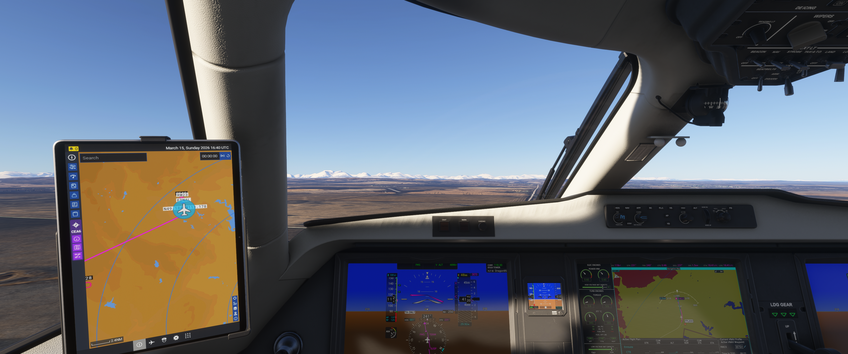
Included in the base game of MSFS. It include a G5000 “glass cockpit”, which is “fancier” version of the G1000. It is hand-flyable (including for landings), but the autopilot has proved mostly among the more friendly. I’ve also found that adding an elevation to the destination airport will show Top of Decesnt (TOD) and the needed descent rate, which is very helpful! I haven’t been able to get the autopilot to change altitudes yet, so I don’t know if I haven’t set up vertical navigation right, or if the autopilot can’t do that on it’s own.
The Flight Level, on YouTube, has a good tutorial that walks through how to get up a flight in the G5000. I like setting up the map like they indicate, as full screen and with the flight plan at the bottom, but have good luck sending the plane flight plans from the EFB.
As a hybrid, you’ll likely need the prop engines to get enough speed for takeoff and climbing out, but they can be throttled right back for cruise to save on fuel. However, the all electric range is only ~100 nm.
My only annoyance is I wish that I could properly hide away the EFB, as it blocks a fair bit of the window.
Overall, I am very much enjoying flying this plane!
-
1,092 nm to be exact. And if you try and fly (much?) beyond that in a one go in FSE, you flight will rejected. ↩